
How to Validate a Dropshipping Product Before Spending on Ads
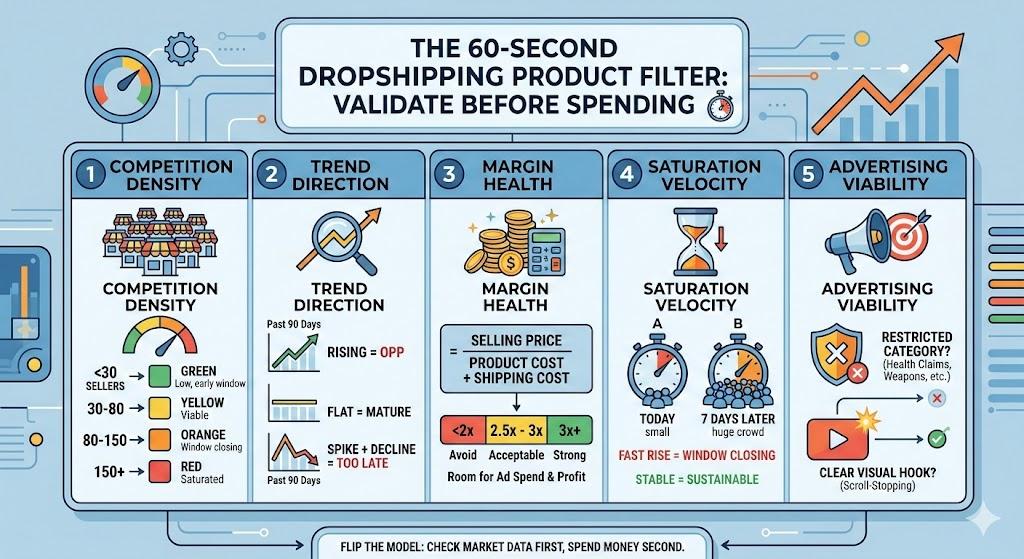
A complete framework to filter bad products in 30 seconds — before you waste $300 on another failed test.
Most dropshippers don't have a product problem. They have a filter problem.
The average product test costs $200–$500 in ad spend. At a 5–10% success rate, that means $2,000–$10,000 wasted before finding a single winner. Not because good products don't exist — but because bad products never got filtered out.
This guide is the filter. A framework to validate any dropshipping product in under 60 seconds, using real market data — before you commit a single dollar to ads.
The Core Problem: Testing Without Validation
The standard advice in dropshipping is simple: find a product, build a store, run ads, see what happens.
It sounds practical. It's actually the most expensive possible approach.
Here's why:
| Step | What Happens | Cost |
|---|---|---|
| Find product on spy tool | See a "trending" product, get excited | $0 |
| Build product page | 2–4 hours of store setup | Time cost |
| Create ad creative | Film, edit, or hire someone | $50–$150 |
| Run ads for 3–5 days | $50–$100/day on Meta or TikTok | $150–$500 |
| Analyze results | Not enough data to conclude anything | $0 |
| Total per product | $200–$650 |
At a 5–10% hit rate, you need to repeat this cycle 10–20 times before finding a winner. That's $2,000–$13,000 in wasted spend — on products that could have been filtered out before step 1.
Validation flips this: check the market data first, spend money second.
What Product Validation Actually Means
Validation is not the same as testing.
| Validation | Testing | |
|---|---|---|
| When | Before any spend | After store setup + ad budget |
| Cost | $0 (or cost of a tool) | $200–$500 per product |
| Time | 30–60 seconds | 3–5 days |
| Output | Go / No-go decision based on market data | Performance data from a live campaign |
| Purpose | Filter out bad products | Prove good products |
Testing tells you how your ad performs for a product. Validation tells you whether the product is worth testing in the first place.
You still test after validation. But you test fewer products, with higher confidence, and you stop wasting budget on products that never had a chance.
The 5 Signals That Predict Product Viability
Every successful dropshipping product shares the same foundational signals. Miss one, and the odds drop dramatically.
Signal 1: Competition Density
The single most important metric. If 200 Shopify stores already sell your product, you're entering a price war — not a market.
How to check:
- Google:
"[product name]" site:myshopify.com - Count results on the first 3 pages
- Check Facebook Ad Library for active ads with the same product
Thresholds:
| Active sellers | Verdict |
|---|---|
| < 30 | Green — low competition, early window |
| 30–80 | Yellow — viable if trend is rising |
| 80–150 | Orange — window is closing |
| 150+ | Red — saturated, avoid |
These aren't absolute rules. A product with 100 sellers but rising Google Trends might still work. A product with 25 sellers and flat trends might not. Context matters — which is why you need all 5 signals, not just one.
Signal 2: Trend Direction
A product's search trend tells you where demand is heading. Rising = opportunity. Flat = mature market. Declining = too late.
How to check:
- Google Trends: search your product, set to "Past 12 months" and "Past 90 days"
- Look for upward trajectory in the last 30 days specifically
What to look for:
| Trend Pattern | Meaning |
|---|---|
| Rising (last 30 days) | Demand growing — good entry signal |
| Flat | Mature market, harder to compete without differentiation |
| Declining | You're late. Window is closing or closed. |
| Spike + decline | Viral moment passed. Don't chase it. |
| Seasonal cycle | Can work if you time it right (see: seasonal calendar) |
Signal 3: Margin Health
If your margin is under 2.5x, you can't afford customer acquisition costs on Meta or TikTok. It's that simple.
How to calculate:
Margin Ratio = Selling Price / (Product Cost + Shipping Cost)
| Margin Ratio | Verdict |
|---|---|
| 3x+ | Strong — room for ad costs and profit |
| 2.5–3x | Acceptable — tight but workable |
| 2–2.5x | Risky — only if competition is very low |
| < 2x | Avoid — no room for profitable advertising |
Check your selling price by:
- Looking at what competitors charge (not what you want to charge)
- The market sets the price, not you. If 10 stores sell it at $24.99, you're selling it at ~$24.99.
Signal 4: Market Saturation Velocity
This is the rate of change in competition — not just the current level. A product with 40 sellers today and 100 sellers a week from now is much worse than one with 40 sellers that's been stable for months.
How to check:
- Monitor competitor count at two points: today and 7 days from now
- Rising fast = window is closing rapidly
- Stable = sustainable opportunity
This is harder to check manually (it requires two data points over time). Automated validation tools track this for you.
Signal 5: Advertising Viability
Some products look great on paper but are restricted or disadvantaged on ad platforms.
Check for:
- Is the product in a restricted ad category? (health claims, before/after, weapons, etc.)
- Does it require a video demonstration to understand? (If yes, and you don't do video, it's a mismatch)
- Is there a clear "hook" for a static image or text-based ad?
- Are competitors running ads successfully? (Check Ad Library)
The 30-Second Validation Process
Here's the actual workflow. Once practiced, this takes under 60 seconds:
Step 1 (5 sec): Google Trends — is the trend rising, flat, or declining?
- Rising → continue
- Flat or declining → stop
Step 2 (10 sec): Competition count — how many active sellers?
- Under 80 → continue
- Over 80 → stop (unless trend is strongly rising)
Step 3 (10 sec): Margin check — is margin ≥ 2.5x?
- Yes → continue
- No → stop
Step 4 (5 sec): Ad viability — any restrictions? Clear hook?
- Clean → continue
- Restricted or unclear → stop
Pass all 4? → Test it. Fail any one? → Skip it. Move to the next product.
This process is binary on purpose. The goal is to eliminate bad products fast, not to agonize over marginal ones. There are thousands of products. Your budget is limited. Speed of elimination = speed of finding a winner.
What Validation Looks Like in Practice
Let's walk through two real examples.
Example A: LED Sunset Lamp
| Signal | Data | Verdict |
|---|---|---|
| Google Trends | Declining for 8 months | Red |
| Competition | 280+ active stores | Red |
| Margin | $8 cost, $24.99 avg selling = 3.1x | Green |
| Ad viability | No restrictions, clear visual hook | Green |
Result: SKIP. Two red signals. Trend is declining and market is saturated. Strong margin and good ad viability can't save a product the market already moved past. This would have been a wasted $300 test.
Example B: Portable Neck Massager (new variant)
| Signal | Data | Verdict |
|---|---|---|
| Google Trends | Rising +60% in 30 days | Green |
| Competition | 35 active stores | Green |
| Margin | $12 cost, $39.99 avg selling = 3.3x | Green |
| Ad viability | Slight health-claim risk, but competitors running ads fine | Yellow |
Result: TEST. Three green signals, one yellow. The health-claim risk is manageable if you avoid making medical claims in your ad copy. This product passes validation — now it deserves your $300 test budget.
Common Validation Mistakes
Mistake 1: Only Checking One Signal
Google Trends says "rising" — so you launch. But you didn't check that 200 stores already sell it. Rising demand + high competition = rising CPMs with shrinking margins. You need all signals, not cherry-picked ones.
Mistake 2: Validating With Emotion
"I love this product, so my customers will too." Your taste is irrelevant. The market's taste — expressed through data — is what matters. If you can't validate objectively, you'll keep picking products you like instead of products that sell.
Mistake 3: Skipping Validation for "Obvious" Winners
"This is clearly a winner, I don't need to check." Famous last words. The product that "obviously" works is often the one 10,000 other people also think "obviously" works. Check anyway. Always.
Mistake 4: Confusing Spy Tool Data With Validation
A spy tool shows you that someone ran an ad. It doesn't tell you if the ad was profitable, if the market is saturated now, or if the window is still open. Spy tool data is historical. Validation is current.
Mistake 5: Spending Too Long Validating
If validation takes more than 2–3 minutes per product, you're overthinking it. The goal is a fast binary filter — yes or no. Save deep analysis for the products that pass.
The Math: Validation's ROI
Let's compare two monthly scenarios with the same $2,000 testing budget:
| Without Validation | With Validation | |
|---|---|---|
| Products evaluated | 6–7 (test everything) | 25–30 (validate all, test few) |
| Products tested | 6–7 | 3–4 (only those that pass) |
| Cost per test | $285–$330 | $285–$330 |
| Total ad spend | $2,000 | $1,000–$1,300 |
| Expected winners (at 5–10%) | 0–1 | 1–2 (higher hit rate on validated pool) |
| Budget remaining for scaling | $0 | $700–$1,000 |
| Time on research | 8–12 hours | 1–2 hours |
The second scenario is better on every metric: fewer tests, higher hit rate, budget left over for scaling, and 80% less time on research. The only variable that changed is adding a 30-second validation step before each test.
When to Skip Validation
Validation isn't always necessary:
- You have a proven supplier relationship and they're recommending a product they know sells. (Trust but verify — still worth a quick check.)
- You're in an ultra-niche market with <10 competitors total. At that level, you can test on instinct because the downside is contained.
- You're testing a proprietary or customized product that doesn't have direct competition. Standard competition metrics don't apply.
For everything else — validate first.
Next Steps
You have two options:
-
Validate manually. Use the 4-step process above with Google Trends, manual competitor counting, and margin calculations. It's free and takes 2–3 minutes per product.
-
Validate automatically. Use a validation tool that checks all signals simultaneously in 30 seconds. Faster, more data points, no emotion.
Either way — stop testing unvalidated products. Every dollar you spend on a product you didn't check is a dollar you can't spend on one that might actually work.
Wasting $300 per failed test adds up fast. Validate your next product in 30 seconds →